
THE ADIOS AI WORKSPACE
Make it with AI.
Make it yours.
Give your idea a working home. Build with an agent, review the source, and try the app before you publish.
Already have code? Bring your repository or use a template.
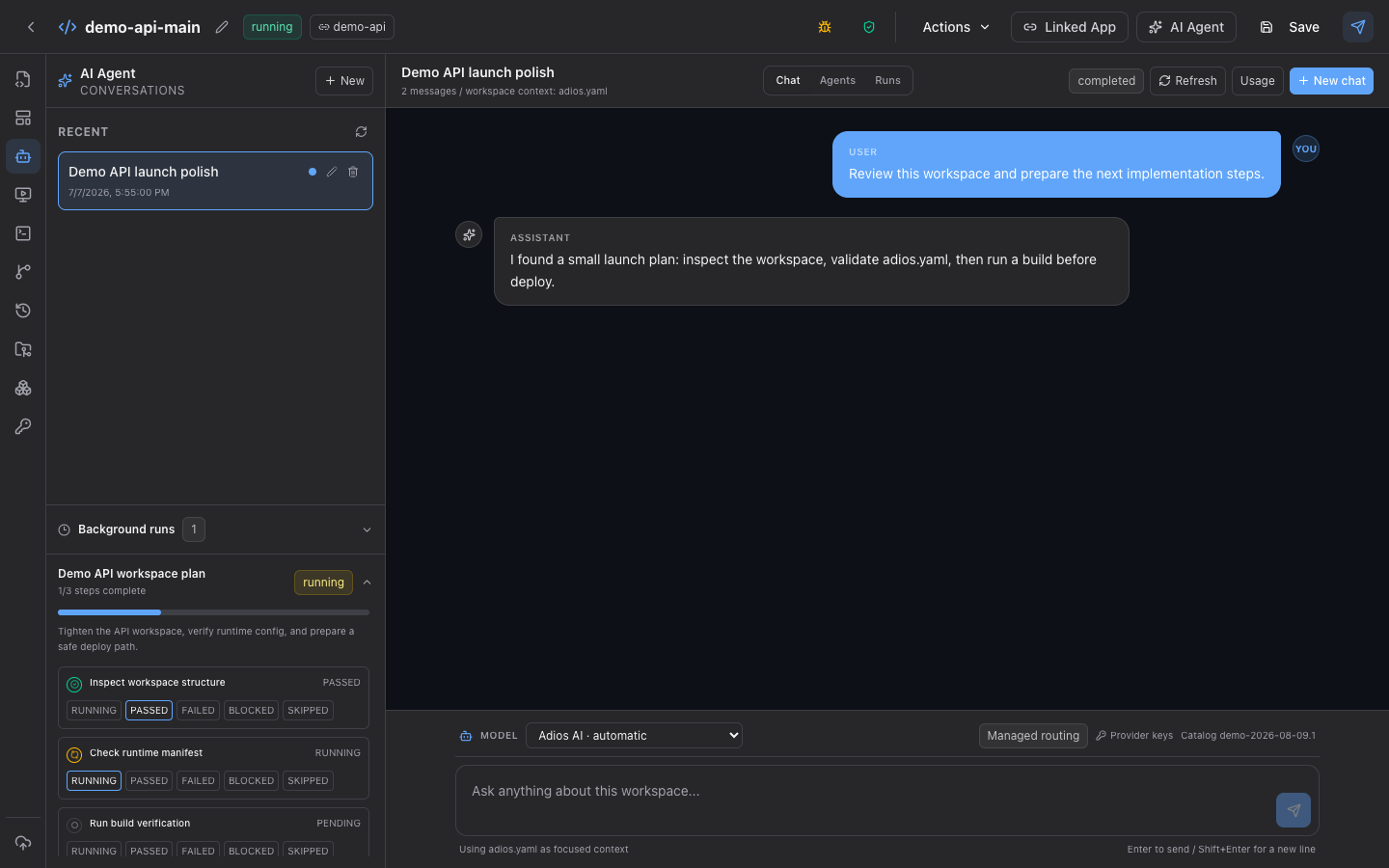 Enlarge screenshot ↗
Agent plan and conversation
A persistent conversation is only half the story. The background plan shows what passed, what is running, and what still needs verification before anyone calls the job done.
The actual Adios interface with demo project data. Choose a screen to see how the work stays connected.
CHOOSE YOUR START
What are you building?
A website or first product
Describe your idea or start from a design. Preview the result and make it yours.
Try Create →02 / PLANA new company
Work through your audience, offer, and launch plan with the Company Agent.
Plan your company →03 / DEVELOPAn app with real source
Bring your stack and work with AI in a source-backed workspace.
For developers →FROM IDEA TO LIVE
AI does the work.
You make the calls.
- 01
Build in context
Give the agent owned source, Git state, runtime configuration, and a persistent project context.
- 02
Check the result
Run declared builds and tests in isolation, then inspect the stable preview, logs, and health evidence.
- 03
Choose when to publish
Promote the accepted healthy version and keep a generated route or verified custom domain attached to it.
BEFORE YOU START
A few useful answers.
Start small, inspect what’s built, and decide whether Adios fits your work.
Follow the first-app guide →What does the sandbox do?
The sandbox is the isolated execution boundary used for declared builds, tests, and preview work. The source and resulting project state remain attached to the workspace instead of disappearing with one execution.
How does an AI agent access an Adios workspace?
An MCP-capable AI client can authenticate through Adios and operate against a selected team and workspace using scoped project tools. It does not receive a general browser shell or unrestricted platform credentials.
Can an AI-created app use a real domain?
Yes. Start with the generated HTTPS route, verify the application, and then attach a verified custom domain with managed TLS to the promoted current release.
Can I review the source before deploying?
Yes. Workspace source, Git changes, declared task output, previews, logs, runtime configuration, and deployment controls stay visible so you can review the result before publishing it.