
A workspace where AI work becomes your product.
Build with AI in the same place you review the code, test the app, and decide when it goes live.
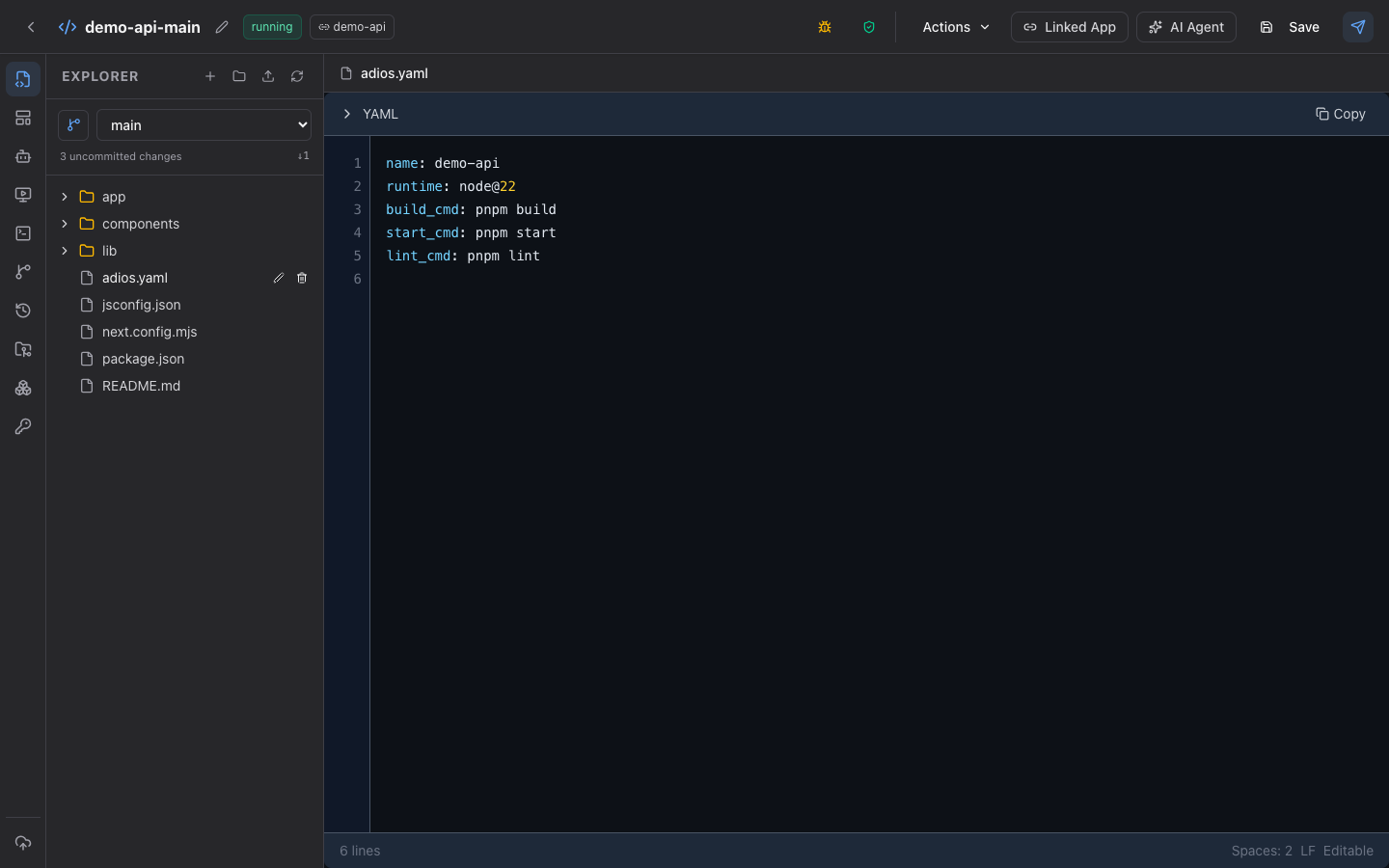 Enlarge screenshot ↗
Repo-aware source editor
The agent works against the same project tree you review. Open the manifest, inspect the source, and keep the current branch and uncommitted state in view.
Actual Adios Workspace, shown with demo project data. Open the interactive tour ↗
HOW IT WORKS
You stay in the loop.
- 01
Open the repository in a source-backed workspace, so the agent starts with the files and configuration that actually exist.
- 02
Let the agent edit, build, preview, and follow the logs without losing the thread between each step.
- 03
Read the diff, check the passing build and click through the preview. Production waits for your decision.
WHY IT BELONGS HERE
The prototype took ten minutes. Shipping it ate the weekend.
AI can sketch a feature before your coffee cools. Then the dependency is wrong, the build breaks, the preview is stale, and the useful error is buried in a log stream three tools away. That last mile is still your problem.
The repo is the context window
The agent starts from the project tree, source, branch, and manifest that actually exist.
Every claim leaves evidence
Plans, diffs, build output, preview state, and logs show what happened after the prompt.
Production still has a door
The agent can prepare and verify a build. You choose which reviewed artifact crosses the threshold.
What’s included
- ✓ The real repository tree and editable source
- ✓ Persistent agent plans, messages, and run state
- ✓ Staged and unstaged Git changes with full diffs
- ✓ Build artifacts, preview state, and searchable logs
- ✓ secret:// references and manifest safety checks
- ✓ A separate production build and deploy boundary
Bring the repo that’s almost working.
Let your agent handle the frustrating last mile: the broken build, the missing configuration, the stale preview, and the log line nobody noticed. Review the evidence, keep control of production, and ship when it’s genuinely ready.
CONNECTED CAPABILITIES
Keep building.
Templates & Starter Apps
Give your AI agent a head start. Skip empty repositories and boilerplate setup with ready-to-deploy starters for web apps, APIs, and microservices that already include healthy commands, manifests, and database routing.
Explore →02 /CLI & Local Development
Work in your preferred local editor and sync with your AI agent's remote Adios workspace. The Adios CLI lets you push source edits, tail build logs, manage secrets, and run deployments directly from your terminal.
Explore →03 /Adios Deployments
Adios makes deployment simple, predictable, and agent-driven. By keeping your build, test, and startup settings in adios.yaml, your AI agent can configure and deploy healthy, production-ready releases automatically.
Explore →